👔 앞서 만들었던 DNN fashionMNIST Classifier의 정확도를 Convolution & Pooling을 사용해서 높이려 한다
👔 fashionMNIST Classifier
before building a classification model ① check the version & load fashionMNIST data & load the training, test split of the fashionMNIST dataset : fashionMNIST dataset is a collection of grayscale 28x28 pixel clothing images. Each image is associated with
sh-avid-learner.tistory.com
① load the data / normalization
: 특히 이미지일 경우 nerul network를 training할 때 normalization 과정(0부터 1사이)을 거치는 걸 권장
import tensorflow as tf

print(tf.__version__) #2.15.0

# Load the Fashion MNIST dataset
fmnist = tf.keras.datasets.fashion_mnist

# Load the training and test split of the Fashion MNIST dataset
(training_images, training_labels), (test_images, test_labels) = fmnist.load_data() #60_000 training images / 10_000 testing images

# Normalize the pixel values
training_images = training_images / 255.0
test_images = test_images / 255.0
② building the classification model
: DNN을 구성하는 Flatten(), 1 hidden layer, output layer 생성에 앞서, Convolution + Pooling 조합을 두 번 사용한다.
# Define the model
model = tf.keras.models.Sequential([

  # Add convolutions and max pooling
  tf.keras.layers.Conv2D(32, (3,3), activation='relu', input_shape=(28, 28, 1)),
  tf.keras.layers.MaxPooling2D(2, 2),
  tf.keras.layers.Conv2D(32, (3,3), activation='relu'),
  tf.keras.layers.MaxPooling2D(2,2),

  # Add the same layers as before
  tf.keras.layers.Flatten(),
  tf.keras.layers.Dense(128, activation='relu'),
  tf.keras.layers.Dense(10, activation='softmax')
])

# Print the model summary
model.summary()

# Use same settings
model.compile(optimizer='adam', loss='sparse_categorical_crossentropy', metrics=['accuracy'])

# Train the model
print(f'\nMODEL TRAINING:')
model.fit(training_images, training_labels, epochs=5)

# Evaluate on the test set
print(f'\nMODEL EVALUATION:')
test_loss = model.evaluate(test_images, test_labels)
→ model.summary()
※ output shape과 # of param 분석 포스팅은 별도 포스팅 참조 ※

→ 결과를 Convolution / Pooling 쓰지 않는 경우와 비교해 표로 정리해보면

→ loss in evaluation은 0.33~0.40에서 0.2709로 소폭 감소(성능 증가), accuracy는 0.8996으로 0.87~0.89에서 소폭 증가(성능 증가)
Q. loss와 accruacy란?
A.
(1) Loss란 loss function에 의해 계산된 수치로, 'a measure of how well (or poorly) your model's predictions match the true labels'. optimization process를 guide해주는 역할. 따라서 loss가 작으면 작을수록 model의 prediction에 관해 correct함 뿐 아니라 confident한 지의 수치도 알 수 있다.
(2) Accuracy란 말 그대로 전체 case 중 올바르게 분류한 case의 비율. %로 나타낸다. 그러나 imbalancd dataset에서는 accuracy 수치를 신뢰할 수 없다. 예를 들어 A라는 type이 5개 이고, B라는 type이 95개 있다고 하면, model이 모두 B로만 classify한다면 accuracy 수치는 무려 95%. 하지만 앞으로 A라는 test set이 들어올 때 A라고 예측을 장담할 수 없다.
→ 따라서 loss는 모델의 성능에 관해 좀 더 자세한 시각을 제공해준다. true label에 대해 얼마나 가깝게 예측할 수 있는 지에 관한 척도. 하지만 accuracy는 단순히 맞혔는 지, 아닌 지 맞힌 비율만 그대로 보여준다. training동안 model은 loss를 최소화하기 위해 optimization process를 진행한다.
③ Visualizing the Convolutions & Pooling
: 각 convolution마다 어떻게 detect하는 지 시각화된 결과로 좀 더 자세하게 알 수 있다. 구축한 모델은 총 32개의 Convolution이 있으므로(0~31) 동일 image에 Convolution number를 달리 해가면서 어떤 Convolution이 어떤 의상 image를 어디 부분을 detect하는 지 그림 결과로 유추할 수 있다.
import matplotlib.pyplot as plt
from tensorflow.keras import models

f, axarr = plt.subplots(3,4)

FIRST_IMAGE=0
SECOND_IMAGE=23
THIRD_IMAGE=28 #0, 23, 28 are all shoes
CONVOLUTION_NUMBER = 1 #0~31: since 32 convolutions

layer_outputs = [layer.output for layer in model.layers]
activation_model = tf.keras.models.Model(inputs = model.input, outputs = layer_outputs)

for x in range(0,4):
  f1 = activation_model.predict(test_images[FIRST_IMAGE].reshape(1, 28, 28, 1))[x]
  axarr[0,x].imshow(f1[0, : , :, CONVOLUTION_NUMBER], cmap='inferno')
  axarr[0,x].grid(False)

  f2 = activation_model.predict(test_images[SECOND_IMAGE].reshape(1, 28, 28, 1))[x]
  axarr[1,x].imshow(f2[0, : , :, CONVOLUTION_NUMBER], cmap='inferno')
  axarr[1,x].grid(False)

  f3 = activation_model.predict(test_images[THIRD_IMAGE].reshape(1, 28, 28, 1))[x]
  axarr[2,x].imshow(f3[0, : , :, CONVOLUTION_NUMBER], cmap='inferno')
  axarr[2,x].grid(False)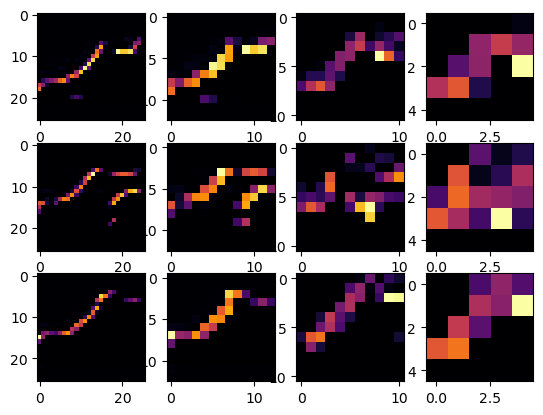
: 1열 세 개 image는 첫 번째 convolution 결과. 2열 세 개 image는 첫 번째 pooling 결과. 3열 세 개 image는 두 번째 convolution 결과. 4열 세 개 image는 두 번째 pooling 결과이다. pooling 이후의 image의 가로, 세로 pixel이 절반으로 줄었음을 그림으로 알 수 있고, convolution의 결과로 일부가 강조되었음을 알 수 있다. 위 그림에서는 신발끈 부분 정보가 집약되어서 강조된 것으로 보인다.
★ 코드 분석 ★
(1) 새롭게 만든 activation_model은 기존의 model input과 동일하지만, output은 각 layer의(모델 과정 도중) output을 넣어 intermediate activation을 가져올 수 있게 하였다.
(2) for x in range(0,4)
: conv2D - pooling 과정을 2번 진행하였으므로 총 4개의 layer가 들어간다. 따라서 차례대로 첫번째 convolution - 첫번째 pooling - 두번째 convolution - 두번째 pooling 의 결과 총 4개 사진 각각 시각화 준비
(3) reshaping해서 CNN 모델에 넣기
: Keras에서의 CNN은 4D tensor format으로 입력을 받기를 기대한다. 따라서 (batch_size, height, width, channels) 형태의 shape으로 입력을 받는다. 위 코드에서는 reshaping to (1,28,28,1). 적합한 입력 shape으로 입력받은 뒤, 각 layer의 activation을 발생시킨다(predict())
→ batch_size = 1) 단 1개의 image로 predicting 진행하므로 1이다.
→ height, width = 28, 28) 입력한 image의 가로, 세로 pixel은 각각 28, 28이다.
→ channels = 1) grayscale image이므로 채널은 1이다. (RGB 이미지라면 the number of channel은 3)
(4) imshow()로 이미지 출력, grid() = False로 grid 없애서 그림 출력
coursera DeepLearning.AI Tensorflow Devleoper Professional Certificate Course
'Deep Learning > Experiments' 카테고리의 다른 글
| 👔 Tuning fashionMNIST Classifier I: Adjusting the Number of epochs (0) | 2024.08.02 |
|---|---|
| 👔 fashionMNIST Classifier (0) | 2024.01.15 |


댓글